![AT Logo Transparent Bkgd.png]](https://learn.accessible-tech.com/hs-fs/hubfs/Logos/Accessible%20Tech%20Logos/AT%20Logo%20Transparent%20Bkgd.png?width=200&height=58&name=AT%20Logo%20Transparent%20Bkgd.png)
How to view & share TippyTalk usage statistics
TippyTalk's statistics feature gives parents, caregivers, and professionals a simple way to track how often the app is being used, monitor key milestones, and gain meaningful insights into a user's communication progress.
What can you see in Statistics?
Usage statistics allow you to:
- See how frequently your child or loved one, student, or client is using the TippyTalk app
- Track key communication milestones over time
- Gain insights that help you better support their progress
You can also share these insights with members of the wider support team. Including therapists, teachers, doctors, or other supporters, to keep everyone informed and aligned.
How to access statistics
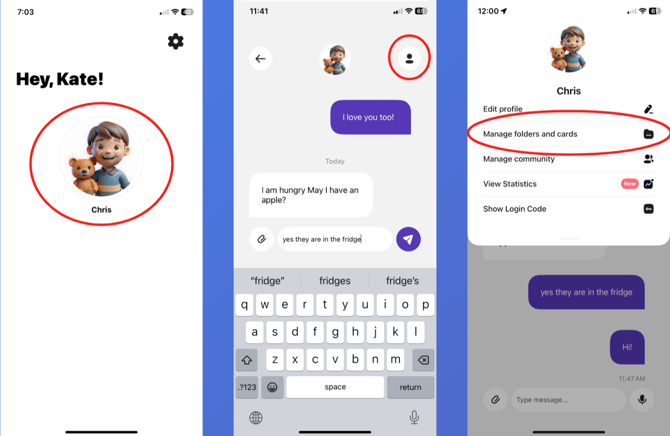
- From the home screen, tap your profile image
- Tap the person icon
- Under your profile, scroll down and tap "View Statistics"
Please note: statistics are currently available for the Community Owner only. Access for Community Members will be released in a future update.